202508 海康机器人叉车与物流大师WMS对接
· 阅读需 3 分钟
使用海康4.3.2版本。
PDA
使用 ClientViewer 2.1.1版本
添加项目
路径:系统管理->添加
添加服务
添加Rcs服务,服务路径为:https://192.168.124.120/
添加请求头:键:X-LR-REQUEST-ID 值:${String(new Date().getTime())}
如何值写错了则会登录失败。
添加应用
选择应用PDA, ClientView 和 RCS 配合使用,选择PDA(标准版)
添加扩展脚本
this.onLogin = async (info) => {
    try {
        // 校验参数
        if (!info.username || !info.password) {
            throw {
                message: this.$t('login.error.need')
            }
        }
        const data1 = await this.$get('/unify/basic/api/unify/challengeCode?username=' + info.username + '&clientType=pda&purpose=0')
        const cData = data1.data
        if (!cData.success) {
            throw cData
        }
        const pas1 = sha256(info.password + cData.data.salt)
        const param = {
            username: info.username,
            password: sha256(pas1 + cData.data.codeId), // 需要对密码做处理
            clientType: 'pda',
            authId: cData.data.authId,
            captchaCode: ''
        } // 调用登录接口
        const {
            data
        } = await this.$post('/unify/basic/api/unify/login', param)
        if (data.success) {
            // 更新token
            mutations.updateToken(data)
            // 登录成功之后跳转至首页
            this.$router.push('/home')
        } else {
            throw data
        }
    } catch (e) {
        this.loginTip = e.message || this.$t('login.error.unknown')
    }
}
上下文
| 属性名 | 属性值 | 类型 |
|---|---|---|
| LOGOUT_METHOD | RCS.logout | String |
发送任务
添加下发任务界面,在界面脚本中添加如下脚本:
// 提交按钮
this.onSubmit = () => {
    const params = {
        targetRoute: [{
                type: 'SITE',
                code: this.form['#startCode'],
                seq: 0
            },
            {
                type: 'SITE',
                code: this.form['#endCode'],
                seq: 1
            }
        ],
        taskType: 'PF-LMR-COMMON'
    }
    const priority = this.form['#initPriority']
    if (!priority || priority === '') {
        params.initPriority = 1
    } else {
        params.initPriority = parseInt(priority)
    }
    const headers = {'X-lr-request-id': new Date().getTime()}
    this.$post('https://192.168.100.88/rcs/rtas/web/schedule/submit', params, {headers}).then((res) => {
        if (res.data.success || res.data.code === '0') {
            this.$tip(this.$text('下发成功'), 'success')
            this.clear()
        } else {
            this.$tip(res.data.message)
        }
    })
}
['#startCode']和['#endCode']为输入框的组件id,['#initPriority']为优先级输入框组件id
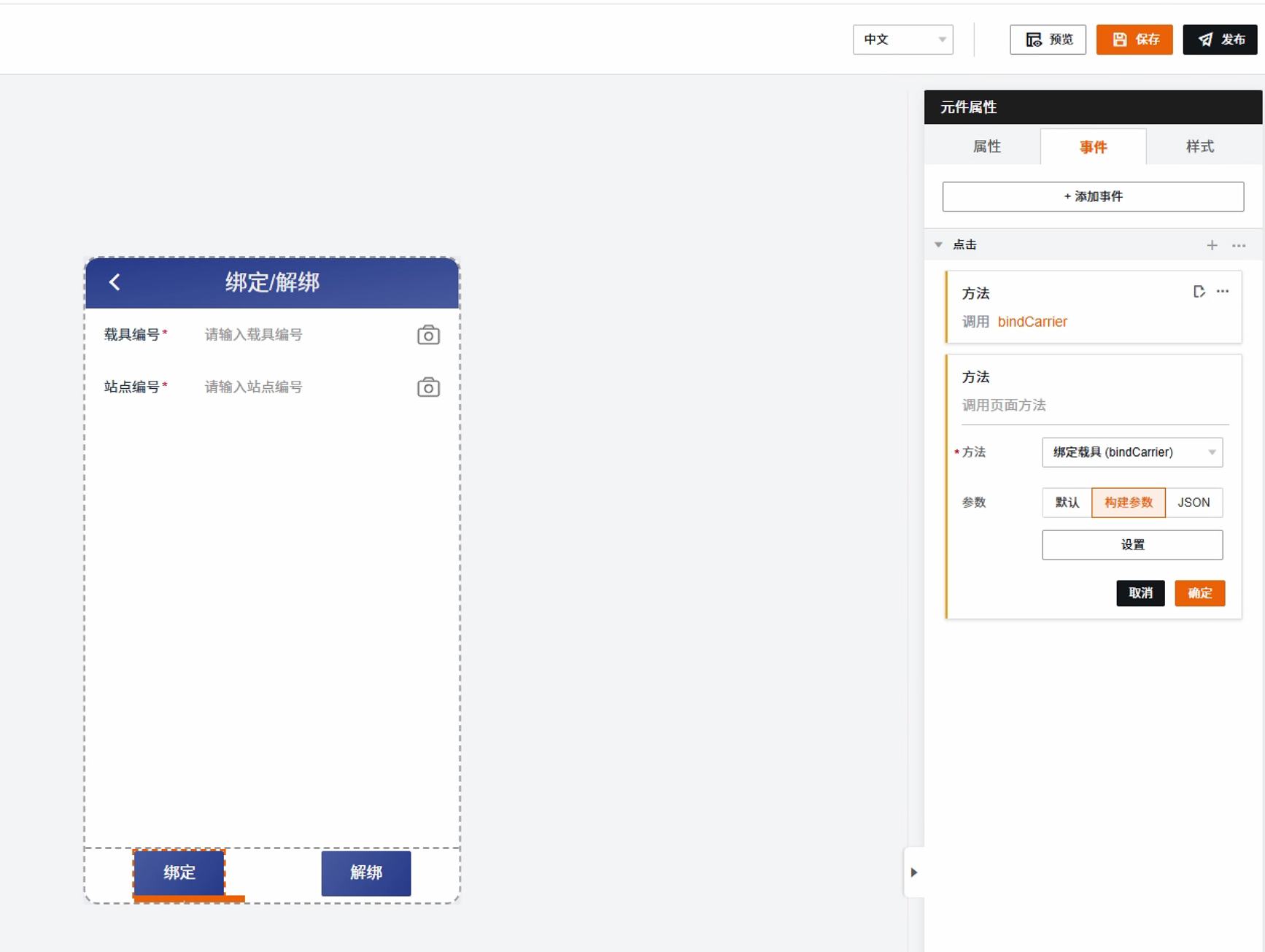
绑定解绑
添加绑定解绑界面,在界面脚本中添加如下脚本:
// 绑定载具
this.bindCarrier = () => {
    const params = {
        carrierCode:this.form['#carrierCode'],
        siteCode:this.form['#siteCode'],
        bindType: "BIND"
    }
    const headers = {'X-lr-request-id': new Date().getTime()}
    this.$post('https://192.168.100.88/rcs/rtas/web/schedule/bindCarrierSite', params, {headers}).then((res) => {
        if (res.data.success || res.data.code === '0') {
            this.$tip(this.$text('下发成功'), 'success')
            this.clear()
        } else {
            this.$tip(res.data.message)
        }
    })
}

// 绑除定载具
this.unBindCarrier = () => {
    const params = {
        carrierCode:this.form['#carrierCode'],
        siteCode:this.form['#siteCode'],
        bindType: "UNBIND"
    }
    const headers = {'X-lr-request-id': new Date().getTime()}
    this.$post('https://192.168.100.88/rcs/rtas/web/schedule/bindCarrierSite', params, {headers}).then((res) => {
        if (res.data.success || res.data.code === '0') {
            this.$tip(this.$text('下发成功'), 'success')
            this.clear()
        } else {
            this.$tip(res.data.message)
        }
    })
}
['#carrierCode']和['#siteCode']为输入框的组件id,
绑定按钮事件
按钮事件-添加脚本方法-选择写好的函数。
现场问题:放货时误报障碍物
现象
叉车送货进入储位放货时,任务中断并提示:
2D激光检测到放货储位点附近存在障碍物,无法继续执行放货任务,传感器坐标(-422 225 63),障碍物高度区间175-175
但现场检查货架储位,里面并没有障碍物。
原因
叉车开启了放货静态检测功能:放货前检测目标储位内是否已存在物体,检测到就停止放货。该功能默认关闭,对应 XML 字段 b_put_obs(0:关闭;1:开启)。
解决方法
在 MapStudioPro 中关闭放货静态检测:
- 用 MapStudioPro 登录叉车 12622,切到"专家模式"。
- 进入 叉车特有配置 → 功能参数,找到"放货静态检测",把开关关掉。
- 点"保存"。